Create AI Videos You Can Actually Edit
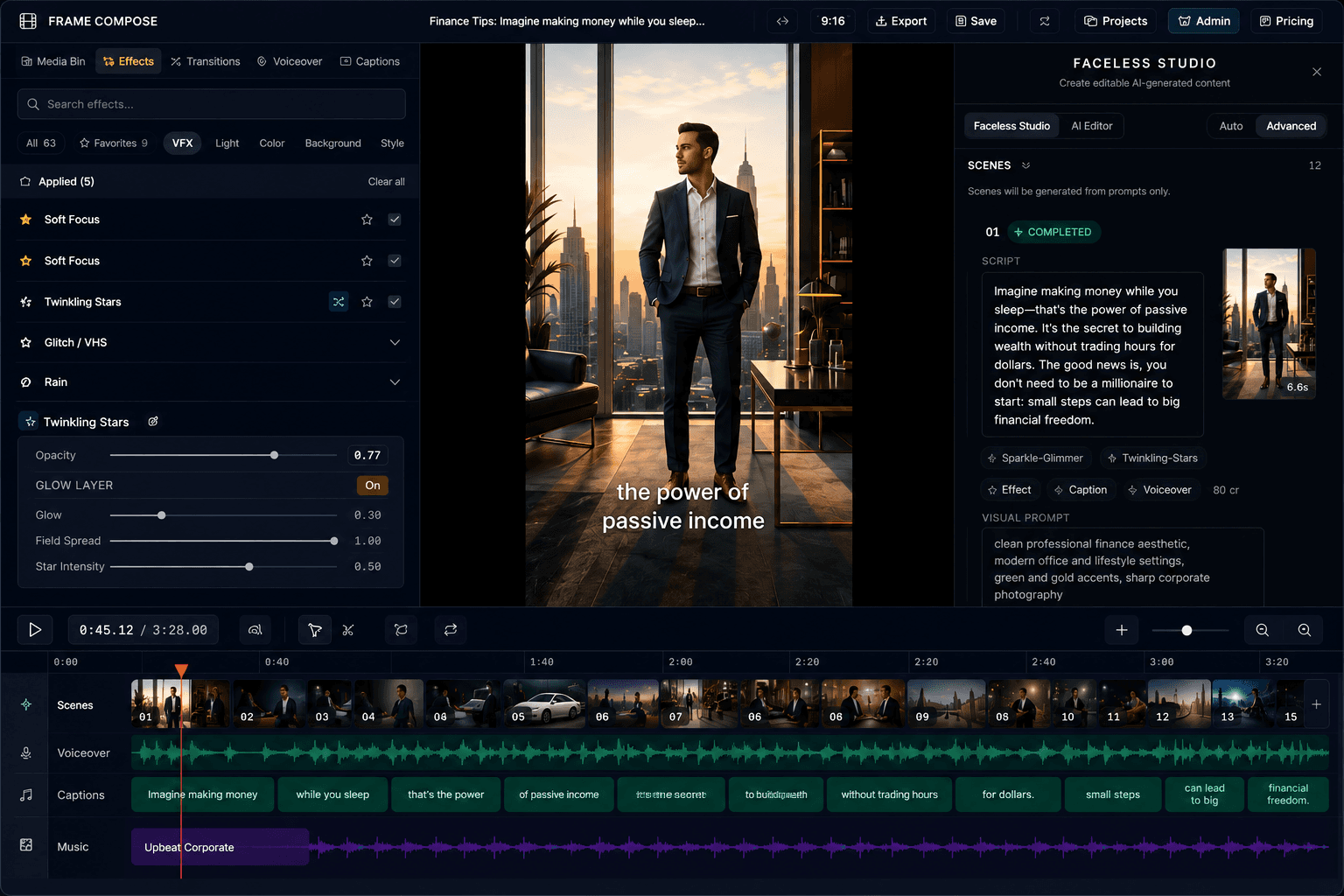
Generate a full faceless video in minutes,
then edit scenes, captions, voiceovers, effects, transitions, and audio
without regenerating the whole video.
FrameCompose
Faceless Studio
Not Just Generated. Editable.
Most AI video tools make you regenerate the whole video to fix one scene, caption, voiceover, or transition. That wastes time, credits, and patience.
FrameCompose gives you a real editable timeline from the start. Every scene stays fully customisable after generation: effects, transitions, captions, voiceovers, and images. Use reference images for consistent visuals. Fix only what needs fixing.
Scene-by-Scene Editing
Customise every scene individually: effects, transitions, captions, voiceover, and visuals.
Free Post-Generation Edits
Tweak captions, fonts, timing, and scene settings after generation without spending credits.
Per-Scene Voiceover Control
Replace or adjust voiceover on a single scene without regenerating the whole video.
Reference Image Consistency
Upload reference images so every scene matches your visual style.
No Full Regens
Fix only what changed, not the entire video. Save credits and time.
Export When It’s Right
Keep polishing for free, then export for TikTok, Shorts, and Reels.
Editable Timeline
Scene-by-scene control
Free Edits
No credits to tweak
Per-Scene Tools
Effects, captions, audio
No Full Regens
Fix only what changed
Export Anywhere
TikTok, Shorts, Reels
Why FrameCompose
No AI video tool gives you this much control
Most AI video tools are a slot machine — you type a prompt, hit generate, and hope for the best. FrameCompose is different. You get granular control over every aspect of the video: the reference images, the art style, the voiceover, the captions, the effects, and the transitions. Even after your scenes are generated, you can keep editing.
Do as little or as much as you want. Type out an idea and hit generate for a one-click video, or go scene-by-scene and fine-tune every detail. It's your call.
One-click generation
Type a video idea and generate immediately — no setup required.
Scene-level editing
Change any scene's image, audio, captions, effects, or transitions after generation.
Full creative control
Choose reference images, art styles, voice, and quality — nothing is a black box.
AI video editor
Remove silence, tighten the pacing, edit captions, adjust voiceover, and automate repetitive edit work in one place.
Learn moreText to video generator
Generate video from text, then keep editing captions and voiceover afterward without leaving FrameCompose.
Learn more100+ free transitions & effects
Add the motion and polish that help videos feel smoother, sharper, and more finished.
Learn moreThe first browser video editor powered end-to-end by WebGPU & WebCodecs
GPU-accelerated
encoding.
Hardware-accelerated video encoding, decoding, and rendering directly in your browser at native speeds.
WebCodecs API
Frame-by-frame control at native speeds
WebGPU
GPU-accelerated rendering pipeline
Media Bunny demuxer
Pure TypeScript media toolkit for browser-native demuxing