Evidence-led comparison

FrameCompose vs InVideo AI: choose the editing workflow, not the slogan

Both products can generate and revise AI video. InVideo AI emphasises prompt-directed changes and its Magic Box. FrameCompose emphasises direct control of generated scenes, captions, voiceover, effects, and uploads on a conventional multi-track timeline.

Maintained by the FrameCompose product team · Last reviewed 6 August 2026

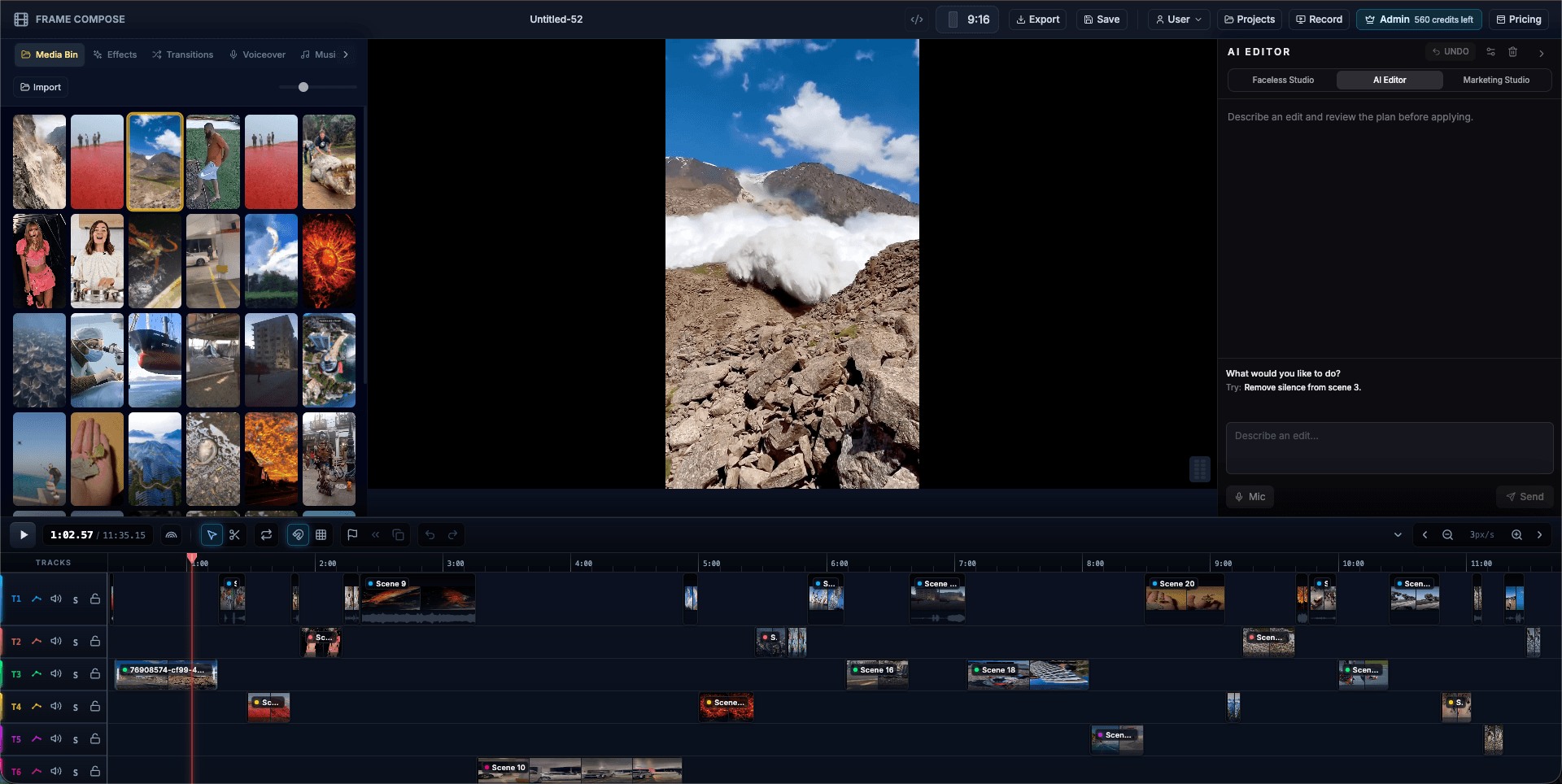
FrameCompose scene-based multi-track browser video editor timeline
Generated scenes land on a conventional timeline for direct manual repair.

Both products support AI generation and post-generation revisions.

InVideo AI documents scene-media replacement and Magic Box prompt editing.

FrameCompose exposes the result on a visible scene-based multi-track timeline.

The right choice depends on how you prefer to diagnose and repair weak scenes.

What InVideo AI already does well

InVideo AI is not merely a locked export tool. Its official help centre documents replacing media in a chosen scene, generating new media, editing scripts, changing transitions, and issuing revision commands through the Magic Box.

That makes it a strong option for creators who prefer to describe changes and let the system perform much of the edit. It also provides a broad stock-media and model ecosystem.

Where FrameCompose is different

FrameCompose puts the generated output onto a visible scene-based, multi-track editor. The creator can select a scene, caption, voiceover, music track, effect, transition, or uploaded asset and adjust it directly.

AI remains available, but it is not the only route to correction. The distinction is less “editable versus not editable” and more prompt-directed editing versus timeline-first editing.

Compare the repair experience

First-generation quality is only half the buying decision. Run the same script in both products, identify one weak scene, and measure how quickly you can replace its media, preserve the accepted narration, check the transition, and export the corrected project.

Choose InVideo AI when a mature prompt-led workflow and automated revisions suit how you work. Choose FrameCompose when you expect to inspect the timeline, preserve accepted scenes, replace assets directly, and make conventional editing decisions after generation.

Pricing, models, and limits change

Both products use evolving providers, plans, and credit systems. This comparison deliberately focuses on the editing workflow rather than embedding a price table that could become stale.

Check both official pricing pages immediately before purchasing, then verify that the models, export terms, watermark rules, and usage limits match your intended volume.

Frequently asked questions

A few quick answers before you jump in.

Can InVideo AI replace individual scene media?

Yes. InVideo’s official documentation describes replacing selected scene media with generated, library, or uploaded media. It should not be described as a completely locked video generator.

Can FrameCompose regenerate only one scene?

Yes. FrameCompose is designed to preserve the surrounding edit while an individual scene is replaced, restyled, uploaded over, or regenerated.

What is the main workflow difference?

InVideo AI centres much of its revision workflow on prompts, the Magic Box, and media or script panels. FrameCompose centres the post-generation workflow on a visible scene-based, multi-track timeline with direct editing controls.

Which product should I choose?

Run the same real script in both and deliberately repair one weak scene. Choose the workflow that makes your likely corrections faster and provides the models, export options, and current pricing terms you need.

Related pages

Explore the rest of the workflow, from first idea to final export.