Faceless Studio

Generate faceless videos you can actually edit

Turn one idea into a finished faceless video: AI visuals, voiceover, and word-by-word captions, all on a real timeline. When one scene is off, you fix that scene. No camera, no microphone, no regeneration roulette.

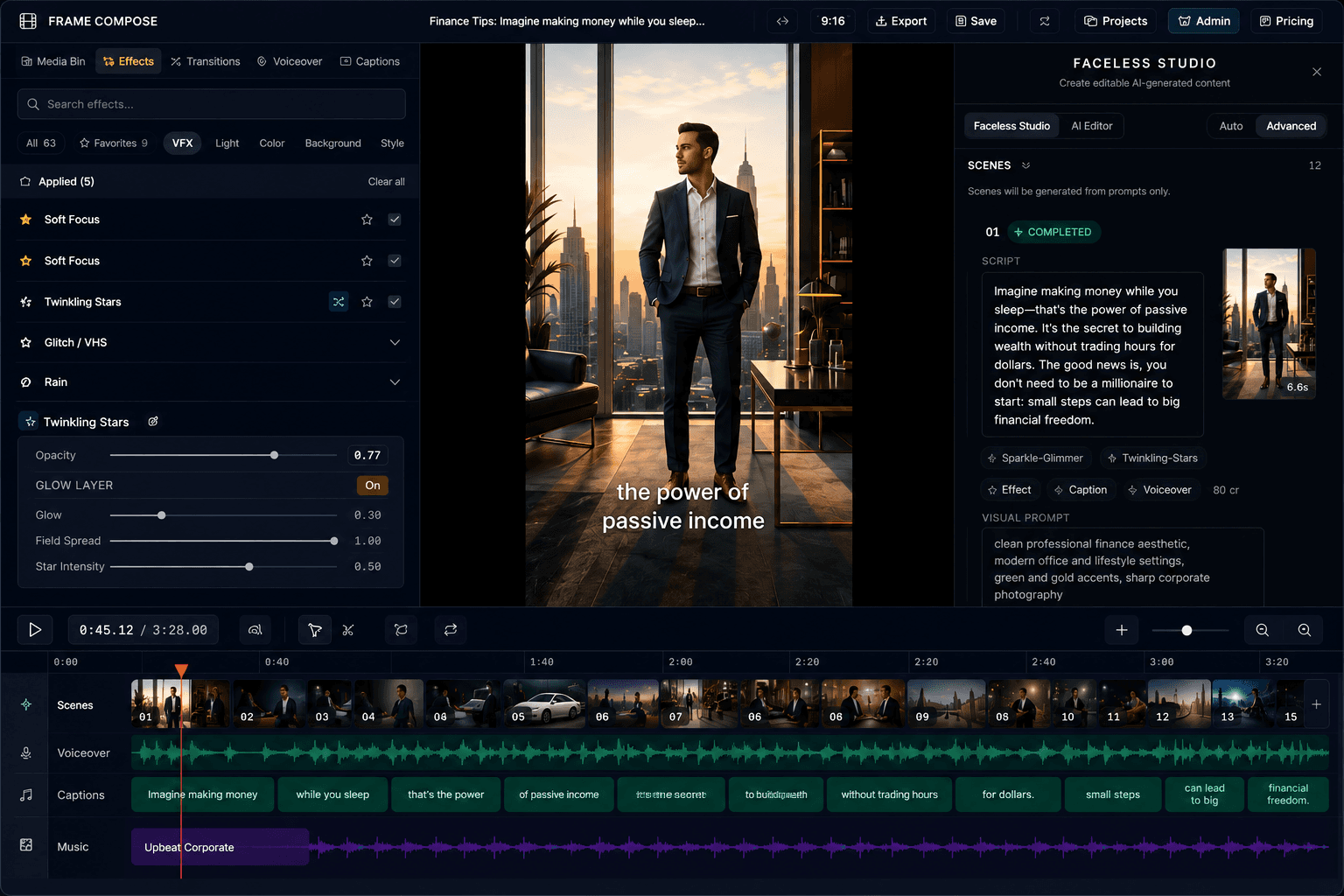
FrameCompose Faceless Studio with generated scenes, script, captions, and voiceover on a multi-track timeline
One idea became these scenes, captions, and voiceover, and every piece stays editable.

Start from a topic, a full script, or a Reddit URL.

AI generates the visuals, voiceover, and synced captions per scene.

Edit any scene individually. No full regenerations, no extra credits.

Export vertical for TikTok, Shorts, and Reels, right from the browser.

Built for faceless channels, not one-off clips

Faceless content lives or dies on volume. A channel that posts daily needs a pipeline, not a one-off generator that produces a locked video you cannot fix. FrameCompose generates the draft and then hands you a real editor, so output number forty is as controllable as output number one.

The voice, captions, and pacing carry a faceless video. All three stay editable after generation: swap the voiceover on one scene, fix a caption word, or tighten a cut without touching anything else.

From idea to draft in minutes

Type what the video is about, paste a script you already wrote, or drop in a Reddit thread. Faceless Studio plans the scenes, generates visuals in your chosen style, records AI narration, and syncs word-by-word captions automatically.

Reference images keep a series visually consistent, so episode twelve looks like episode one. Project settings remember your style, voice, and caption preferences between videos.

The editable difference

Most faceless video generators are slot machines: prompt, generate, hope. If scene three is wrong, you regenerate the whole video and pay again. FrameCompose treats generation as the first draft. The video lands on a timeline with every scene, caption, voiceover line, and effect exposed.

Edits after generation are free. You spend credits creating scenes, not polishing them, which changes the economics of running a channel.

Everything runs in the browser

Generation, editing, and final rendering all happen in your browser using WebGPU and WebCodecs. There is nothing to install, projects are local-first, and exports render at native speed without an upload queue.

Frequently asked questions

A few quick answers before you jump in.

How does the faceless video generator work?

Type an idea, a script, or a Reddit URL. Faceless Studio plans the video scene by scene, generates the visuals, records an AI voiceover, and syncs word-by-word captions. The result lands on a real timeline where every scene stays editable.

Can I edit the video after it generates?

Yes, and that is the point. Swap a single image, reword a caption, regenerate one voiceover line, retime a transition, or change the pacing. You fix only what changed instead of regenerating the whole video.

Do I need to show my face or record my voice?

No. Visuals are AI-generated or uploaded, and narration comes from AI voiceover included free on every plan. Faceless channels can produce videos end to end without a camera or microphone.

How much does it cost to generate a faceless video?

Scenes start at about 3 cents each, and you only pay for the AI generation step. Every edit after generation is free, so polishing a video does not burn credits. The free plan includes local projects, voiceover, transcription, and captions.

What platforms can I export faceless videos to?

Export 9:16 for TikTok, YouTube Shorts, and Instagram Reels, or 16:9 and 1:1 for YouTube and feeds. Rendering happens in your browser at native speed, with no upload queue.

Related pages

Explore the rest of the workflow, from first idea to final export.