Marketing Studio
Turn a screen recording into a marketing video.
Auto-zoom, captions, music, and AI voiceover turn a raw screen recording into a polished promo for your product built to convert.
Turn text into video. Edit every scene, caption and voiceover.
Turn a screen recording into a marketing video.
Auto-zoom, captions, music, and AI voiceover turn a raw screen recording into a polished promo for your product built to convert.
Describe the edit you want to make.
An assistant for cuts, captions and timeline changes in plain language. Coming soon; Video Studio and the timeline editor are available now.
Choose a plan for AI generation, or buy credits as you go.
For your first videos.
$0forever
2 free AI scenes every day
No credit card required.
For weekly creators.
$20USD / month
Four 1,000-credit packs: $39.96
1,000 credits every week
Cancel anytime
Subscription credits refresh weekly and don't roll over. Purchased credits never expire.
One payment. Credits never expire.
$9.99USD once
Every AI model unlocked. No subscription.
| Feature | Free | Creator Pack | Pro |
|---|---|---|---|
| Timeline editor & exports | |||
| Projects | Unlimited | Unlimited | Unlimited |
| Selected AI voices & auto captions | |||
| Effects & transitions | 100+ | 100+ | 100+ |
| Max upload size | 200 MB/file | 1 GB/file | 1 GB/file |
| AI scene generation | 2 free/day | 1,000 credits | 1,000/week |
| Animate scenes into video | Seedance 2.0 + more | ||
| One-shot video generation | |||
| Premium image & video models | |||
| Premium voice & TTS models | |||
| Marketing Studio | |||
| Reference images & characters | |||
| AI voice design | |||
| Cloud projects & autosave | |||
| Unused credits | Stay until spent | Weekly allowance resets |
Credits are spent on paid AI generation. For example, one GPT Image 2 image at low quality with no reference images costs 4 credits. Other models, higher quality, references and regenerations change the cost. Standard AI video scenes start at 80 credits, with cost depending on the model and duration. You see the quoted credits before generating. Editing, captions, effects, browser exports, and selected AI voices are free. Other voice options require payment.
No. It’s a one-time purchase. You get 1,000 credits that never expire, and it unlocks every AI model and premium feature while you have credits left. Need fewer? The 500-credit option is still available on the same card. Nothing renews, and you can upgrade to Pro later if you start creating regularly.
One-time pack credits stay in your account until you spend them. They never expire, whether or not you have a subscription. Pro, Studio and Max have a separate weekly allowance that resets every Monday at 00:00 UTC; unused weekly credits do not carry forward. If you have both, we use your weekly allowance first, then your purchased balance.
Yes, and not as a trial. The editor, captions, effects, browser exports, and selected AI voices are free. The Free plan also includes 2 free AI scene generations per day, resetting at midnight UTC, so you can see how generation works.
You can keep editing and exporting everything you’ve made - nothing locks. Weekly credits refresh every Monday (1,000 on Pro, 2,750 on Studio, 5,500 on Max), you can top up extra credits anytime from the billing page, or upgrade to a bigger plan and Stripe simply charges the prorated difference.
Yes. Cancel Pro in two clicks from the billing page. You keep Pro access until the end of your billing period, and your projects stay yours.
Most AI video tools hand you a finished file - if one scene is wrong, you regenerate the whole thing and pay again. FrameCompose gives you an editable draft on a real timeline, so you fix the one scene, caption, or voiceover that needs it. Edits are free; you only pay for generation.
The editable difference
Fix a caption. Replace one visual. Adjust the pacing. Your generated scenes stay separate on a real timeline, so you can change the part that needs work and keep the rest of your video.
Scene-by-Scene Editing
Customise every scene individually: effects, transitions, captions, voiceover, and visuals.
Free Post-Generation Edits
Tweak captions, fonts, timing, and scene settings after generation without spending credits.
Per-Scene Voiceover Control
Replace or adjust voiceover on a single scene without regenerating the whole video.
Reference Image Consistency
Use reference images to guide the look of your scenes.
No Full Regens
Fix only what changed, not the entire video. Save credits and time.
Export When It’s Right
Keep polishing for free, then export for TikTok, Shorts, and Reels.
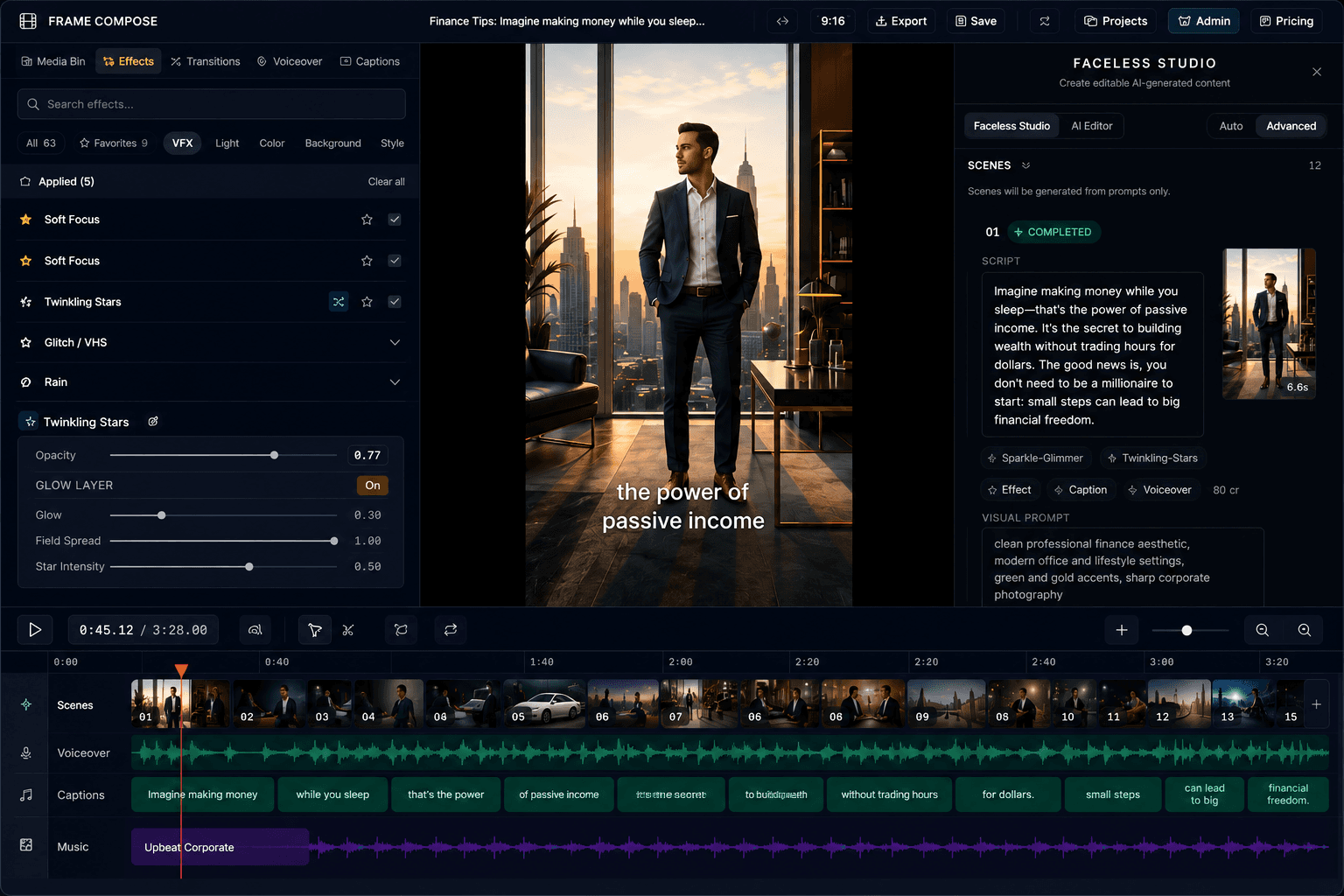
Editable Timeline
Scene-by-scene control
Free Edits
No credits to tweak
Per-Scene Tools
Effects, captions, audio
No Full Regens
Fix only what changed
Export Anywhere
TikTok, Shorts, Reels
How it works
Start with a simple idea. Review the scene plan, generate the visuals, then use the timeline to make the video yours.
Enter a topic or your own script. Video Studio turns it into a scene-by-scene plan.
Check your opening scene and plan. Choose which remaining scenes to generate.
Replace a visual, correct a caption, or adjust the pacing without starting again.
Export for TikTok, Shorts or Reels. Return to the same project for your next edit.
Why FrameCompose
A useful first draft should not become a dead end. Keep the scenes you like, replace the ones you do not, and adjust captions, voiceover, effects and timing in the same editor.
Manual timeline edits do not use AI credits. Generating new AI media can use credits, so you can decide what is worth regenerating and what simply needs an edit.
Turn a topic or script into a scene plan you can review before creating the rest.
Change any scene's image, audio, captions, effects, or transitions after generation.
Choose visuals, art styles and voices, then adjust individual scenes on your timeline.
The difference
Export a video for sharing. Keep an editable project for the changes you make next.
For sharing
FrameCompose
Remove silence, tighten the pacing, edit captions, adjust voiceover, and automate repetitive edit work in one place.
Learn moreUse the screen recorder to capture your website, app, or product demo, then add captions, effects, auto zooms, voiceover, and narration.
Learn moreGenerate video from text, then keep editing captions and voiceover afterward without leaving FrameCompose.
Learn moreAdd the motion and polish that help videos feel smoother, sharper, and more finished.
Learn moreCommon questions
No. Open FrameCompose in your browser and start creating. A modern desktop browser gives you the full editing and screen-recording workflow. There is no software to install.
Yes. The editor, captions, effects, browser exports, and selected AI voices are free. After signing in, the Free plan includes 2 free AI image scenes per day. Extra AI generation and premium models use credits. You do not need a credit card to start.
Yes. Correct captions word by word, adjust timing, replace a visual, or work on one scene’s voiceover without rebuilding the whole video. Manual timeline edits are free; generating new AI media can use credits.
Additional AI images, animated video, and premium generation options use credits. The cost depends on the model and settings. Moving clips, correcting caption text, adjusting timing, and applying timeline effects do not use AI credits. See Pricing for the current allowances and options.
Export vertical 9:16 video for TikTok, YouTube Shorts, and Instagram Reels, or use 16:9 and 1:1 for other formats. Browser export renders on your device; the time it takes depends on your video and hardware.
Yes. You can upload your own footage, voiceovers, and images, or mix AI-generated scenes with your own clips. The same editable timeline handles both.
Yes. Open Projects to continue the same editable project rather than starting again. Local projects stay in the browser and device where you created them, so keep that browser’s site data. The exported video is for sharing; your project is what you return to for edits.
Engine
Preview and export on your device in supported desktop browsers. AI generation runs online; performance depends on your device and the size of your project.
WebCodecs
Decode and encode on your device
WebGPU
GPU-accelerated rendering
Browser-native demuxing
Start with AI or upload your own clips. Edit the details, export when you are ready, and keep working in the same project.