For SaaS teams

Ship a demo video with every feature launch

Record the new feature, and FrameCompose drafts the video: auto zooms on the UI, word-by-word captions, music, and AI voiceover. Editable end to end, so release day does not depend on a video team.

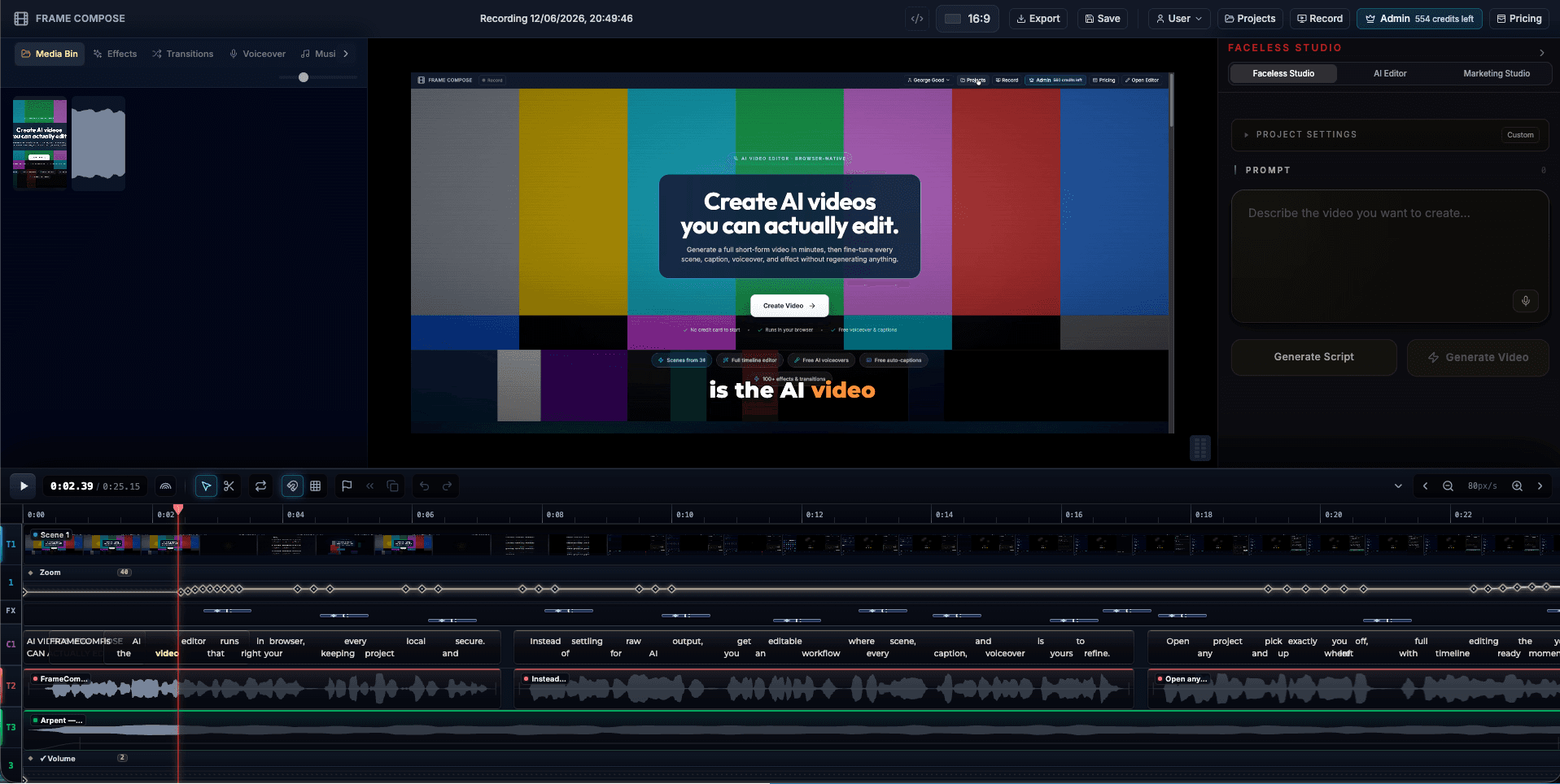
FrameCompose turning a SaaS screen recording into a launch video with captions and zoom keyframes
A feature walkthrough on the editable timeline: captions, zooms, and audio tracks.

One workflow for launch videos, onboarding clips, and changelog updates.

Auto zooms keep dashboard UI legible, even in vertical exports.

Word-by-word captions for the majority of viewers watching muted.

Nothing to install, so anyone on the team can produce a clip.

Every release deserves a video, few get one

SaaS teams ship weekly, but launch videos arrive quarterly, because each one costs somebody an afternoon in an editor or a ticket to an agency. Meanwhile the changelog, the docs, and the marketing site make the same announcement with static screenshots.

When the video takes minutes instead of an afternoon, the calculus flips: the demo clip becomes part of shipping the feature, not a nice-to-have that follows two weeks later.

Recording to release clip, in the browser

Record the feature flow with the built-in screen recorder. FrameCompose drafts the edit with zooms on the panels you touched and captions from your narration, or an AI voiceover from a script if you would rather not use your voice.

The draft lands on a real timeline. Tighten the pacing, fix a caption, retime a zoom, and export. Wide for the blog post and landing page, vertical for the social announcement.

Consistency without a style guide

Because the captions, zoom behavior, and music come from the same tool, clips made by different teammates still look like they came from the same company. Product, marketing, and support can each make their own videos without diverging visually.

Built for B2B constraints

Dashboards with dense UI, small text, and multi-step flows are exactly what auto zooms are for: the viewer sees the panel being discussed, not a shrunken full-screen capture. Onboarding sequences can be re-recorded per release without rebuilding the edit.

Frequently asked questions

A few quick answers before you jump in.

What kinds of SaaS videos can I make?

Feature launch announcements, onboarding walkthroughs, changelog and release-note clips, support how-tos, and landing page demos. Anything that starts with your product on a screen.

How is this different from a generic screen recorder?

A recorder gives you raw footage. FrameCompose also drafts the edit: auto zooms on the UI you interacted with, word-by-word captions, music, and optional AI voiceover, all on an editable timeline. The gap between "recorded it" and "shippable video" is the part that gets automated.

Can my whole team use the same workflow?

Yes. Because recording and editing run in the browser with nothing to install, anyone on the team can produce a consistent-looking feature clip: product managers, marketers, and support alike.

Do dashboards and small UI text survive compression?

Auto zooms are the answer: instead of showing a full dashboard at 100 percent width, the video zooms into the panel you are demonstrating, so text stays legible even on a phone screen.

Can I re-edit a video after publishing a new version of my product?

Projects stay editable. Re-record the changed flow, swap the clip, keep your captions and structure, and export again. You do not rebuild the video from zero for every release.

Related pages

Explore the rest of the workflow, from first idea to final export.