Text-story guide

Write the reveal first. Make every message earn the next one.

A text-message story is a tiny screenplay between two people. Start with the reveal, preview the conversation, then choose a single image or an editable project with message clips and typing pauses. Narration and music are optional; the chat images do not require AI image generation.

Maintained by the FrameCompose product team · Last reviewed 26 September 2026

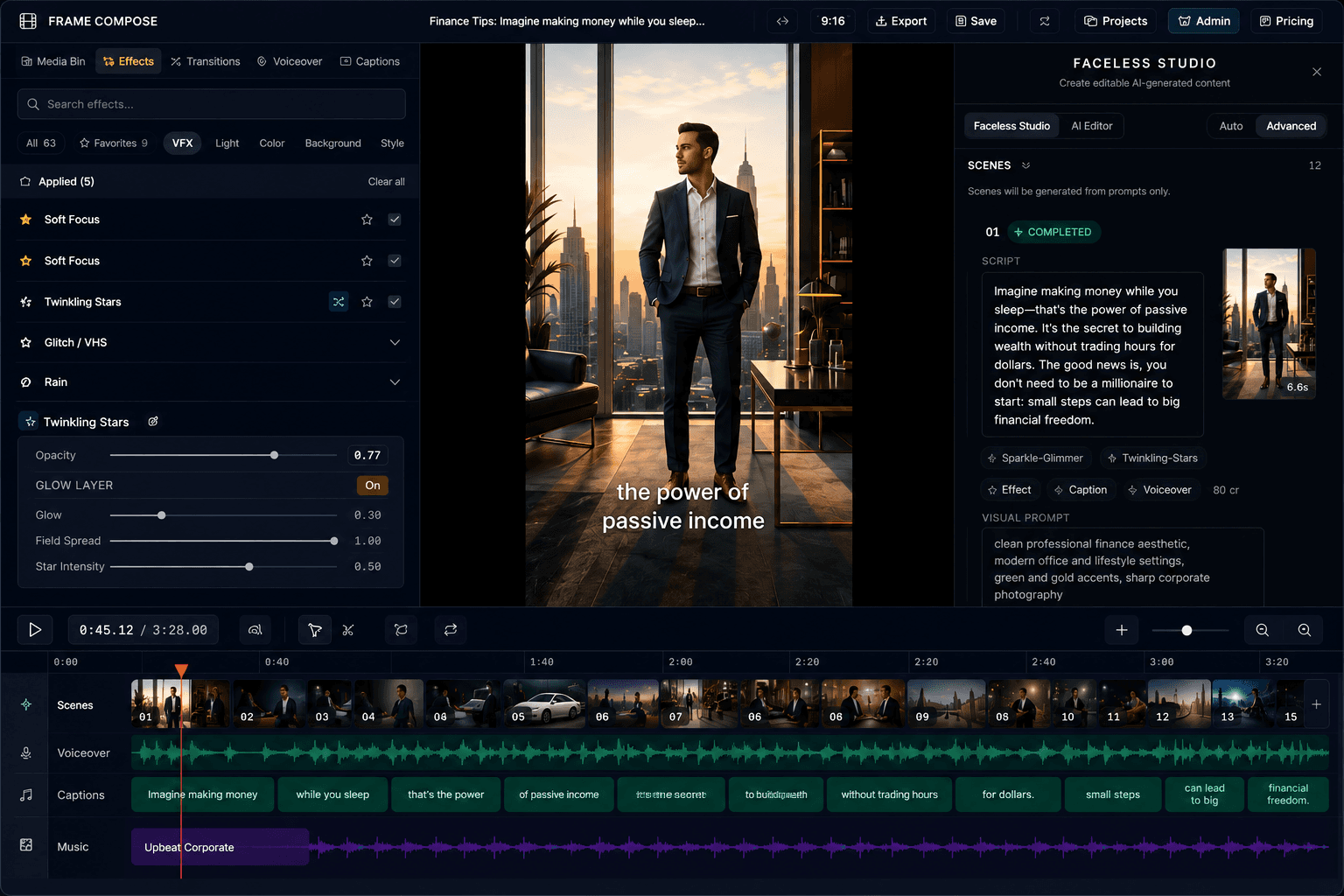
FrameCompose browser editor with media, scenes and a multi-track timeline
Conversation projects place message images and separate typing pauses on an editable timeline.

Choose two fictional speakers and one clear source of tension.

Write the final reveal before filling in the earlier messages.

Preview every bubble for clarity and realistic reading speed.

Open editable chat clips; add narration or music only when the story needs it.

1. Decide what the final message changes

Write the last important message first. It should reveal evidence, expose a false assumption, or force one speaker to make a decision. A final bubble that merely repeats the premise will feel like the story stopped rather than ended.

Then write one sentence describing what the viewer believes before the reveal and what they understand afterwards. That contrast is the spine of the conversation.

2. Give each speaker a distinct job and voice

Keep the conversation between exactly two people so the viewer can immediately understand which side owns each bubble. One speaker usually wants an answer while the other delays, denies, redirects, or reveals information.

Use different vocabulary and message lengths for each person. Names, emojis, and slang can help, but the story should still be understandable without relying on colour alone.

3. Build the reveal one message at a time

A practical six-beat structure is: normal opening, suspicious detail, denial, specific evidence, reversal, and final consequence. Delete greetings or reactions that do not change the situation.

Keep most messages to one or two short lines. Long explanations slow the visual rhythm and make the viewer read ahead instead of waiting for the next bubble.

Fictional example: Wrong-number mystery

The envelope gives the mystery a concrete object. Let the denial register before the next reply, and hold the camera revelation long enough to read. This is an invented scenario, not a real conversation.

Unknown: Your porch light is still on
Me: Sorry, who is this?
Unknown: The person who left the red envelope
Me: There is no envelope
Unknown: Then someone got there before you
Me: Wait - I can see it moving on the camera

Fictional example: Wedding reveal

The first problem appears to be a booking mistake; the denial changes it into a question about identity. Leave a clear reading pause after “I never sent an account”. All names and events are fictional.

Maya: The venue just cancelled our booking
Me: That makes no sense - I paid yesterday
Maya: You paid the old account
Me: The account you sent me?
Maya: I never sent an account
Me: Then who has been replying from your number?

Fictional example: Workplace receipt

The device name is the evidence that changes the accusation. Keep it visible before the final denial rather than rushing both messages together. This is a fictional writing exercise, not an allegation about a real workplace.

Jordan: Did you delete the launch files?
Me: No, I lost access this morning
Jordan: The audit says your login removed them
Me: Check the device name
Jordan: It says Conference Room Mac
Me: I have never used that computer

4. Choose an image or an editable conversation project

Paste 3–24 “Name: message” lines from exactly two speakers into the free text story maker, or load one of the matching example buttons. The second speaker appears on the blue side. Check names, bubble lengths and the complete thread before choosing an output.

Download image saves the conversation as one PNG. Make this a video prepares the message reveals and separate typing pauses on a timeline. A free account is required to create and save the video project. Your conversation carries through sign-in. Preparing the chat clips does not call an AI image model or generate narration.

Each six-message example above creates six message clips and five typing clips. Play the timeline to inspect the reveal order, then trim or extend the individual clips. A successful PNG download and a useful video project are different outcomes; you do not need to generate extra media to make either worthwhile.

5. Check reading time before adding optional sound

The starting timeline gives every message at least two seconds, with longer holds for longer messages. Typing pauses start between 0.7 and 3 seconds. These are editable starting values, not a guarantee of readability or an optimal retention formula.

Watch once at a phone-sized view without sound. Hold the evidence and final reveal until they are readable, and shorten only pauses that genuinely drag. Add optional narration or music after the silent sequence works; then check that speech does not outrun the visible message.

Before publishing, review the complete export, confirm the dialogue is fictional or authorised, and check that no private names or messages have slipped into the example. Keep the editable project when you need to revise the wording or timing later.

Frequently asked questions

A few quick answers before you jump in.

How many messages should a text-message story video have?

Use the fewest messages needed to establish the situation and deliver the reversal. Six to twelve concise bubbles is a useful starting range, but clarity matters more than a fixed count.

Should every message be narrated?

Not necessarily. Narration can improve accessibility and pacing, but a readable silent version can work when the message timing, captions, music, and sound design carry the scene.

Can I make an iMessage-style story for free?

Previewing and downloading a PNG work without an account. Creating a video project requires a free account, but preparing its chat-image clips does not request AI image generation. Narration, music and additional generated media are optional; check the relevant editor option before requesting a paid generation.

Can I use a real private conversation?

Only when you have the right and permission to publish it. For entertainment examples, use fictional names and details and never make invented messages look like evidence against a real person.