Evidence-led comparison

FrameCompose vs Runway: generation platform or editable video workflow?

Runway offers a deep generative media platform, prompt-based video transformation, Agent, and timeline assembly. FrameCompose focuses on generating a complete video and keeping its scenes, captions, voiceover, effects, transitions, and uploads directly editable in one browser timeline.

Maintained by the FrameCompose product team · Last reviewed 6 August 2026

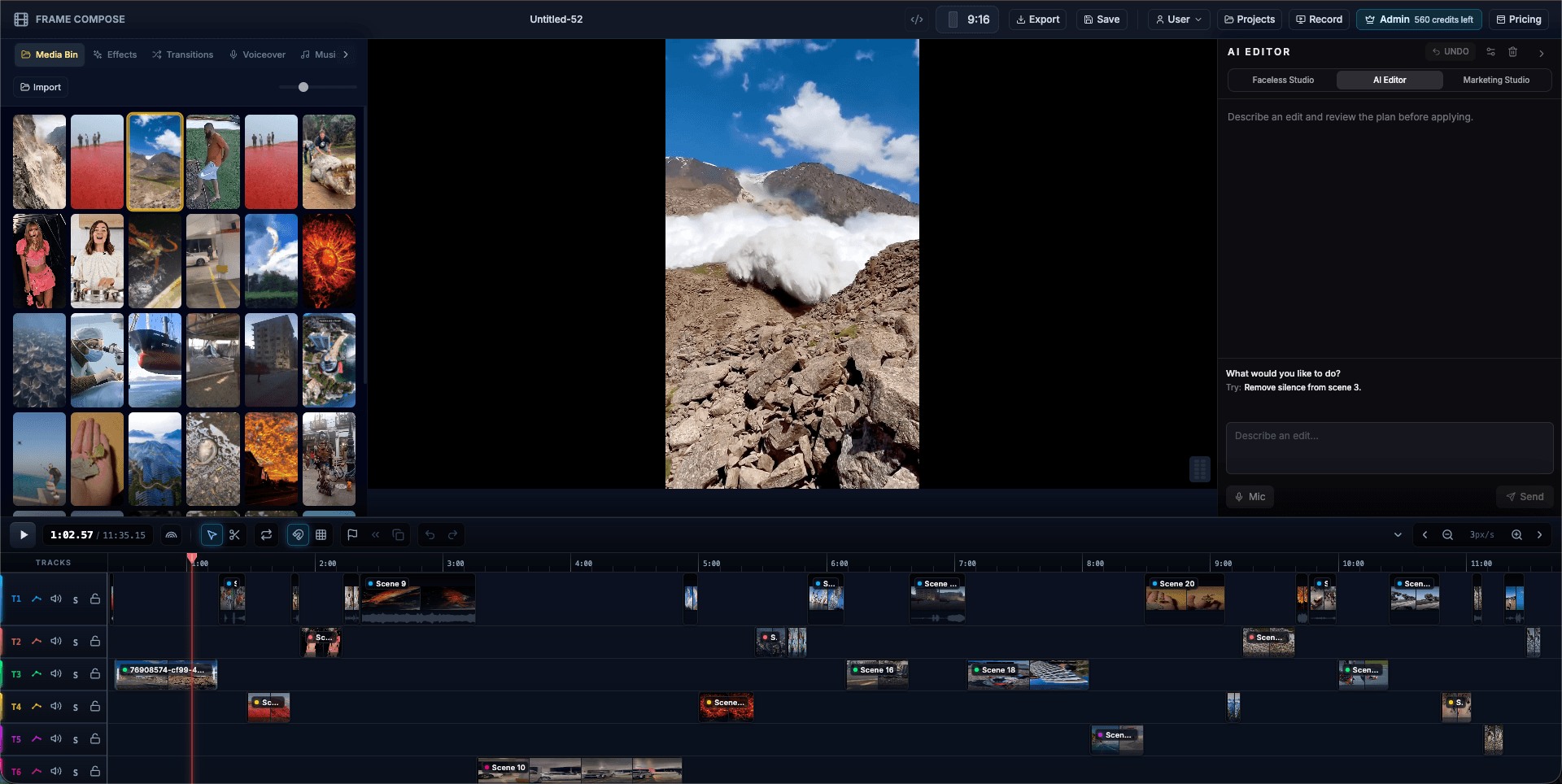
FrameCompose browser video editor with generated scenes, captions, voiceover, effects, and timeline tracks
A generated project remains split into editable scene, caption, voiceover, music, effect, and transition layers.

Runway offers advanced generation, Agent, Edit Studio, and a Final Cut timeline for assembling clips.

FrameCompose generates a structured social video and keeps every scene and supporting layer editable.

Runway is especially strong for creating and transforming individual visual assets and shots.

FrameCompose is especially strong when the final deliverable needs script, narration, captions, effects, and timeline repair in one workflow.

What Runway already does well

Runway is a broad creative platform rather than a simple text-to-video tool. Its current product includes advanced video and image models, Runway Agent, voiceover and audio generation, prompt-based video editing through Edit Studio, and a Final Cut timeline for trimming and assembling clips.

Runway is a strong choice when the hardest part of the job is producing or transforming a visually ambitious shot. Edit Studio can restyle footage, swap products, change environments, remove objects, and apply an edit across short multi-shot sequences.

Where FrameCompose is different

FrameCompose starts from the complete-video problem. A prompt can produce a script, scene plan, visuals, animation, narration, captions, effects, transitions, and music, then place those parts onto a conventional multi-track timeline.

The creator can replace one scene, correct one caption, swap one voiceover take, upload a new clip, retime a transition, or adjust an effect without treating the whole output as a single generated file. Editing, captions, voiceover, effects, and exports do not consume generation credits.

Compare the real repair workflow

Do not compare only the first impressive generation. Build the same 30 to 60 second social video in both products, then deliberately break one scene, change one sentence, replace one voiceover line, and alter the pacing around a transition.

Choose Runway when its model breadth, Agent workflow, and prompt-based shot transformation solve the difficult part of your work. Choose FrameCompose when you want the generated result to behave like an editable video project whose script, captions, narration, media, effects, and timing stay visible together.

Pricing and model access change frequently

Both products use credits, and both regularly change their available models, generation costs, storage, export terms, and plan limits. This comparison therefore focuses on workflow instead of freezing a price table that may become inaccurate.

Check the official pricing pages immediately before buying. Estimate the cost of your actual mix of image generation, video generation, retries, clip transformation, narration, captions, and final editing rather than comparing headline monthly prices alone.

Frequently asked questions

A few quick answers before you jump in.

Does Runway have a timeline editor?

Yes. Runway Agent includes a Final Cut timeline for arranging, trimming, splitting, and layering clips, voiceover, and music. Runway also states that its older standalone video editor is no longer actively maintained, so buyers should compare the current Agent and Studio workflows rather than relying on older reviews.

What is the main difference between FrameCompose and Runway?

Runway is strongest as a broad generative media platform with advanced image, video, audio, Agent, and prompt-based transformation tools. FrameCompose is built around turning a complete generated video into editable scene, caption, voiceover, effect, transition, and media blocks on one browser timeline.

Which is better for repairing one weak scene?

Runway offers powerful prompt-based clip transformation and regeneration. FrameCompose is designed for preserving the accepted project while replacing, uploading over, restyling, or regenerating one selected scene and then checking its captions, voiceover, timing, and transition in context.

Can I use Runway and FrameCompose together?

Yes. A practical workflow is to create or transform specialist clips in Runway, upload the accepted results to FrameCompose, and assemble them with narration, captions, effects, music, transitions, and other generated or uploaded scenes on the final timeline.

Related pages

Explore the rest of the workflow, from first idea to final export.