Seedance 2.5 online: up to 30 seconds of AI video with sound.
Use Seedance 2.5 from ByteDance Seed, listed as Seedance 2.5 (newest) and ranked first for quality in FrameCompose. Describe a moment or start from your own picture and get one clip of 4 to 30 seconds with the picture and sound made together, from 156 credits for 5 seconds at 480p. It lands on a full timeline, ready for captions, voiceover, music and export.
Maintained by the FrameCompose product team · Last reviewed 5 November 2026
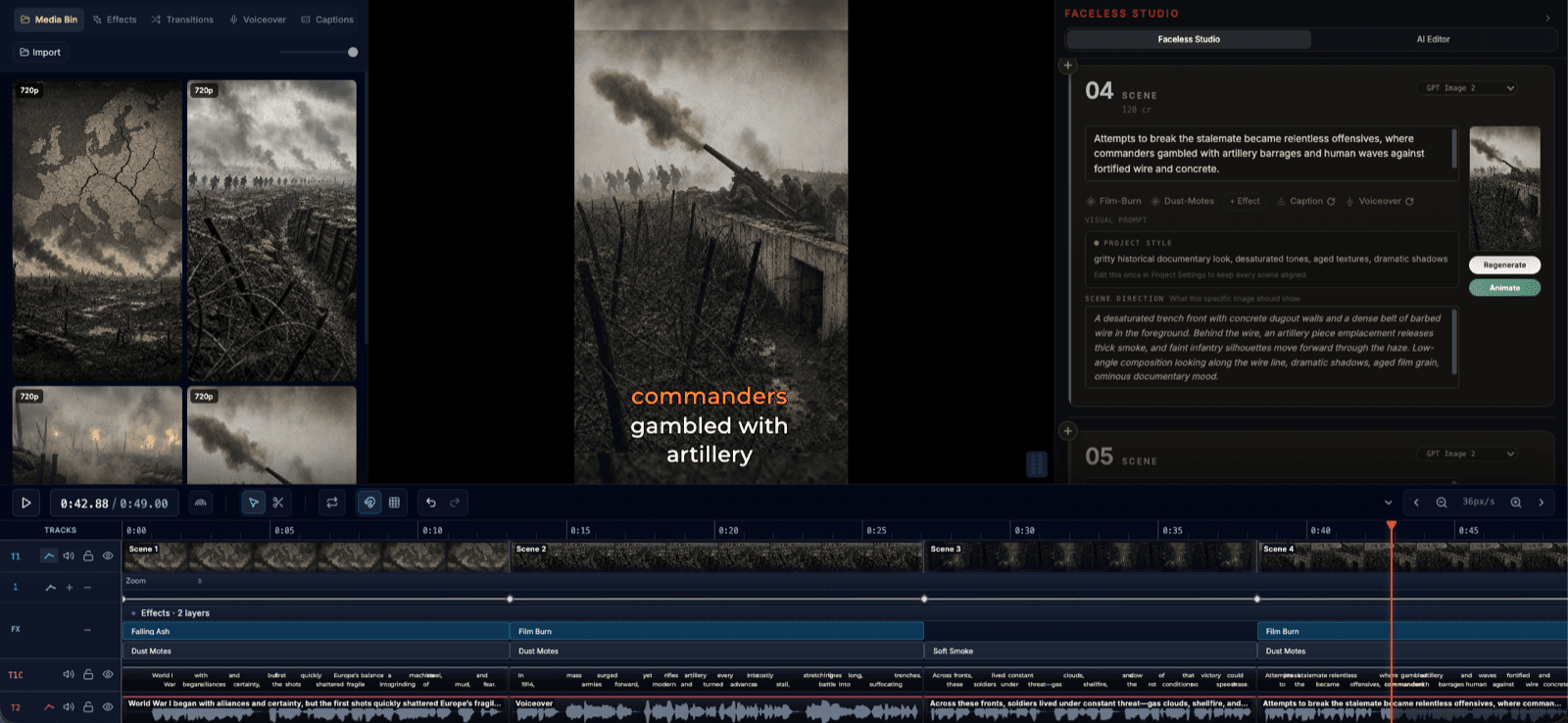
Type the moment in Video Studio and the Seedance 2.5 clip lands on your timeline.
Clips from 4 to 30 seconds, at 480p, 720p or 1080p.
Picture and sound made together, at no extra credits.
Start from a few words or from your own picture.
See each clip’s price before it is made. Failed clips are refunded.
Seedance 2.5 price in credits
What one Seedance 2.5 clip costs in FrameCompose, by length and quality. The same price shows on screen before the clip is made.
Clip length
480p
720p
1080p
5 seconds
156 credits
347 credits
781 credits
10 seconds
311 credits
694 credits
1,561 credits
15 seconds
466 credits
1,041 credits
2,341 credits
30 seconds
931 credits
2,081 credits
4,681 credits
Sound is included at every price. Image to Video in the editor makes its clips at 720p.
What Seedance 2.5 is best at
FrameCompose ranks Seedance 2.5 first for quality, so it is the one to pick when a shot has to look its best. Describe a character, a product or a whole scene, add the camera move you want, and it plays the moment out in one clip of up to 30 seconds, against 15 on Seedance 2.0.
ByteDance Seed built it to make picture and sound together, so it can make dialogue, ambience and sound effects with the picture. In FrameCompose that sound costs no extra credits.
Make a Seedance 2.5 clip from a few words
Open Video Studio and type your idea. Under the box, set Make to Video clip, pick 5s, 10s or 15s, and press Make clip.
The AI Editor plans the shot and shows a card with its price. Pick Cheapest, Medium or Best, or choose Seedance 2.5 (newest) in the Model list, then check Length, Quality and Sound.
Press Make clip on the card to spend the clip's credits, and the finished clip lands on your timeline. Planning it uses one AI Editor message (2 credits on a credit account). One request spends at most 600 credits, which keeps every purchase easy to check; for a longer clip, start from a picture with Image to Video below.
One moment, two shots, then the sound
Typed into Video Studio with Video clip picked.
A fox in a red scarf skis down a snowy slope in a wide shot, then a close-up as it laughs. Sound: wind, skis on snow and the fox shouting "Woohoo!"
A product moment
One clear subject, one light, one move.
Slow push-in on a glass perfume bottle on wet black stone, rain falling, soft gold light. Sound: rain on stone and a soft glass chime.
Bring your own picture to life
Import a picture into the editor and press Animate on it in the Media Bin. In the Animate Image dialog, pick Seedance 2.5 under Animation Provider; every model shows its price beside it.
Choose how the picture guides the clip. Prioritize action uses it as a visual reference so the scene can move freely; Preserve this composition keeps it as the exact opening frame. Describe the motion in Animation Prompt and press Start Animation. The clip runs as long as the picture sits on your timeline, from 5 up to 30 seconds.
Prompt tips for Seedance 2.5
Write one moment you could film in one go: who or what, doing what, and where. Two or three shots of that moment in order, each with its framing, work well, followed by one line for the sound: ambience, effects and any dialogue in your own words.
Name the camera move in plain words, such as "slow push-in" or "the camera circles the product". Give a long clip one clear beat: a 30-second shot reads best as one scene with one main action. For a longer story, make several clips and join them on the timeline, or let Video Studio build the whole video scene by scene.
The right model for every shot
For a photo with a lifelike face, real or AI-made, pick Kling 3.0. ByteDance turns those pictures down on Seedance 2.5, so FrameCompose checks your photo first: Image to Video switches to Kling v3 or offers it with one tap, and the AI Editor suggests it too. If a clip is ever turned down, your credits come back automatically.
Want sound in the clip for fewer credits? Seedance 2.0 makes it too, at up to 15 seconds a clip.
Your Seedance 2.5 clip is a normal clip on a full timeline. Trim it, add captions, voiceover, music, effects and transitions, mix it with other clips and export from your browser. Timeline editing and browser exports are free.
Yes. Use Seedance 2.5 from your browser, with nothing to install, when you want FrameCompose's top-ranked model: one clip of up to 30 seconds with sound. Type an idea in Video Studio or animate your own picture, then edit the clip on a full timeline.
How much does Seedance 2.5 cost?
A 5-second clip is 156 credits at 480p, 347 at 720p and 781 at 1080p, sound included. A 30-second clip at 480p is 931 credits. You see the exact price before the clip is made, and making it from words in Video Studio also uses one AI Editor message.
Is Seedance 2.5 free?
A Seedance 2.5 clip uses credits, from 156 for 5 seconds at 480p, taken from a one-time credit pack or a paid plan and shown before you start. Everything around the clip is free: the timeline editor, captions, effects and browser export.
How long can a Seedance 2.5 clip be?
From 4 to 30 seconds in one clip. Video clip in Video Studio offers 5, 10 or 15 seconds, and Image to Video goes up to 30.
Does Seedance 2.5 make sound?
Yes. It makes dialogue, ambience and sound effects together with the picture, and in FrameCompose that sound costs no extra credits.
Can Seedance 2.5 animate a photo of a real person?
For a photo with a lifelike face, real or AI-made, pick Kling 3.0. When Seedance 2.5 would be the Animate dialog’s starting pick for that photo, FrameCompose picks Kling v3 instead; if you choose Seedance 2.5 yourself, the dialog warns you and offers Use Kling v3 with its price. If a clip is ever turned down, your credits come back automatically.
Related pages
Explore the rest of the workflow, from first idea to final export.