Kling 3.0 by Kling AI

Kling 3.0 online: turn your photos into video.

Kling 3.0, listed as Kling v3 (cinematic motion) in FrameCompose, keeps your photo as the exact opening frame and is our top pick for photos of real people. Make a 3 to 15 second clip from a photo or from words, at 126 credits for 5 seconds at any quality, then add voiceover, music and captions on a full timeline.

Maintained by the FrameCompose product team · Last reviewed 5 November 2026

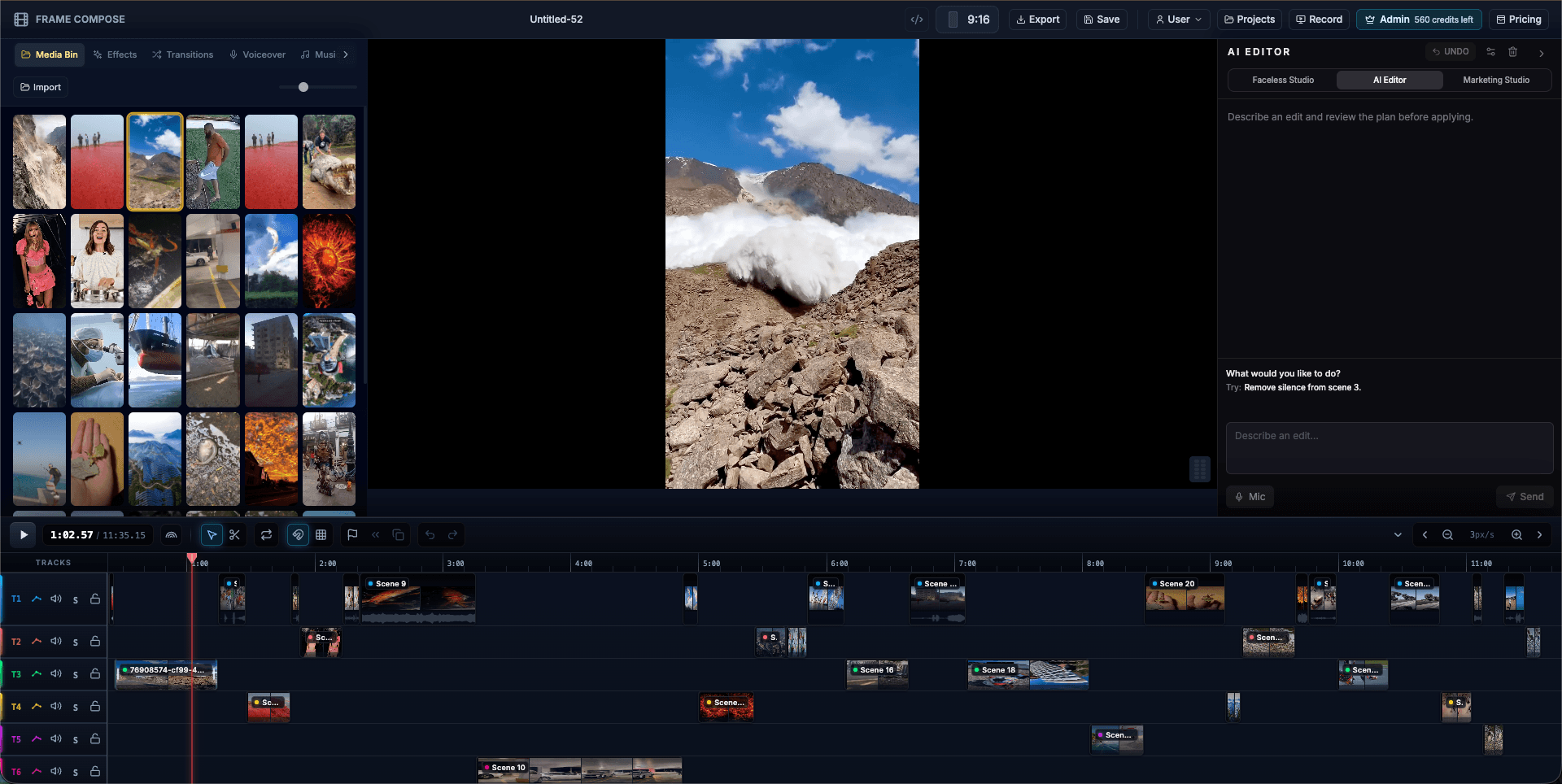
FrameCompose browser editor with an AI video clip, captions and audio on a multi-track timeline
Your Kling clip lands on the timeline, ready for a voiceover, music and captions.

Clips from 3 to 15 seconds, from a photo or from words.

Your photo stays the exact opening frame.

126 credits for 5 seconds, at any quality setting.

Our top pick for photos of real people.

Kling 3.0 price in credits

What one Kling 3.0 clip costs in FrameCompose. The price is the same at every quality setting and shows on screen before the clip is made.

Clip lengthCredits
5 seconds126 credits
10 seconds252 credits
15 seconds378 credits

Kling clips come without sound, so add a voiceover or music on the timeline.

What Kling 3.0 is best at

Kling's own guide calls it Kling VIDEO 3.0; FrameCompose lists it as Kling v3 (cinematic motion), tagged for products and directed motion. Start from a photo and the clip opens on exactly that frame, so faces, outfits, packaging and backgrounds begin just as they are in your picture, then move the way you describe.

It is the model FrameCompose turns to for photos of real people. Pick Seedance for one and Image to Video offers Kling v3 with one tap, while the AI Editor suggests Kling v3 for a new clip of that photo.

Animate a photo with Kling 3.0

Choose Image to Video, import your photo and press Animate on it in the Media Bin.

In the Animate Image dialog, pick Kling v3 under Animation Provider; its price shows beside it. Describe the motion in Animation Prompt, or tap a motion preset, and press Start Animation.

The clip runs as long as the photo sits on your timeline, from 5 up to 15 seconds, and lands right on the timeline.

A portrait that comes alive

Your photo is the first frame.

She turns to the camera and smiles as the camera slowly pushes in.

A product hero shot

One move for the subject, one for the camera.

The sneaker rotates slowly on its stand while the camera arcs around it.

Make a Kling 3.0 clip from words

In Video Studio, type the moment, set Make to Video clip and press Make clip. On the AI Editor card, choose Kling v3 (cinematic motion) in the Model list and press Make clip to spend the clip's credits. Planning it uses one AI Editor message (2 credits on a credit account).

Kling clips come without sound, so the voiceover and music you add on the timeline always have the stage to themselves.

Prompt tips for Kling 3.0

Start from a sharp, well-lit photo with your subject clearly in frame, because the clip begins on it exactly. Then say what moves: the subject, the camera, or both.

For a portrait, name the expression change and the push-in. For a product, name the turn and the camera arc. One subject move and one camera move give Kling v3 a clean shot to direct, and for a longer moment you can make two clips and join them on the timeline.

When to pick Seedance instead

For a scene or product shot where you want sound made with the picture, pick Seedance 2.5 for up to 30 seconds or Seedance 2.0 for up to 15, both at no extra credits for the sound. For a photo with a lifelike face, real or AI-made, stay with Kling v3.

Frequently asked questions

A few quick answers before you jump in.

Is Kling 3.0 the same as Kling v3 in FrameCompose?

Yes. Kling's own guide calls the model Kling VIDEO 3.0. FrameCompose lists it as Kling v3 (cinematic motion) in Video Studio and the AI Editor, and as Kling v3 in Image to Video.

Can I use Kling 3.0 online?

Yes. Use Kling 3.0 from your browser, with nothing to install, to bring a photo to life from its exact first frame. Animate a photo with Image to Video or make a clip from words in Video Studio, then edit it on the timeline.

How much does Kling 3.0 cost?

126 credits for 5 seconds, 252 for 10 seconds and 378 for 15 seconds, at any quality setting. You see the price before the clip is made, and making it from words in Video Studio also uses one AI Editor message.

Is Kling 3.0 free?

A Kling 3.0 clip uses credits, 126 for 5 seconds at any quality setting, shown before you start. After the clip lands, timeline editing, captions and browser export are free.

Can Kling 3.0 animate a photo of a real person?

Yes. Kling v3 takes photos of real people and keeps your photo as the exact opening frame, which is why FrameCompose picks it for them. Use photos of yourself or of people who said yes.

How long can a Kling 3.0 clip be?

From 3 to 15 seconds in FrameCompose. Image to Video makes clips of 5 seconds or more, as long as the photo sits on your timeline.

Does Kling 3.0 make sound in FrameCompose?

Kling clips in FrameCompose come without sound, so your own voiceover and music lead. For sound made with the picture, pick Seedance 2.5 or Seedance 2.0.