
Keep the same character in every scene, every video, every episode

Design a character once and FrameCompose draws it the same way in every scene. Each saved character has a portrait, a four-view character sheet and its own voice, and those references go into every scene the character appears in. Reuse the character across videos and episodes, give it outfit variants, put it next to up to four other characters, animate any scene into a moving clip, and export in 4K with no watermark. Pay once from $5.99 with a pack that never expires, or go Pro for $20 a month.

7 free animated scenes a week. No credit card needed.

Or start from one of these

See what you can make

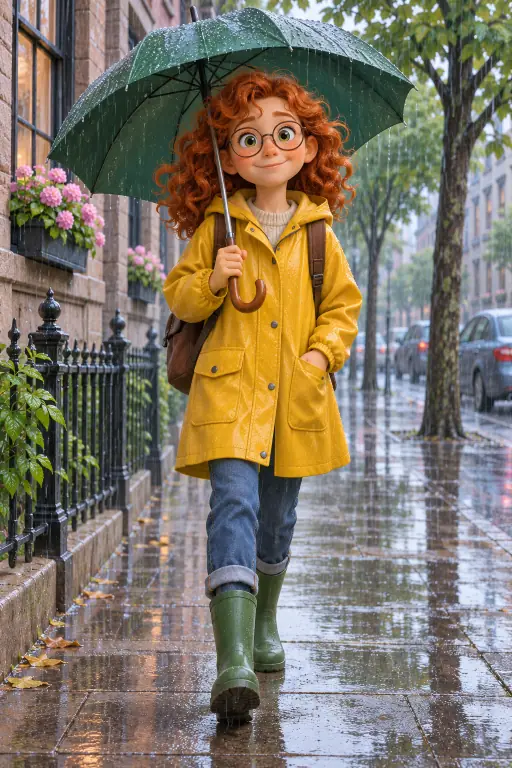
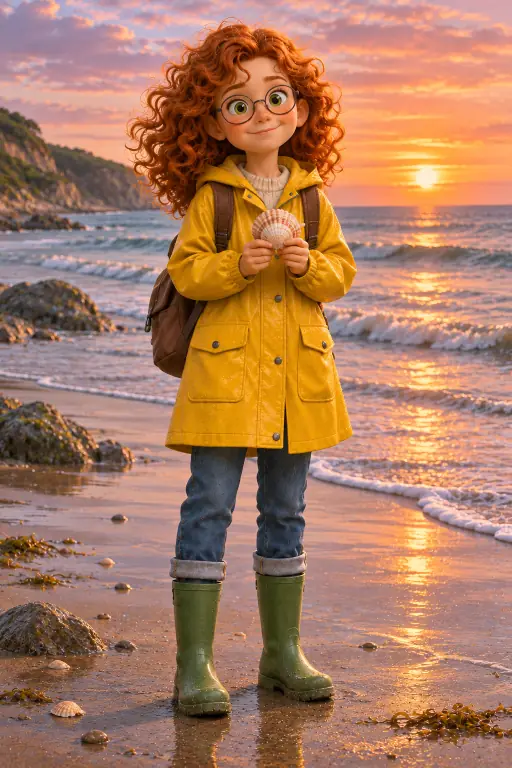
A red-haired girl in a yellow raincoat on a rainy streetThe same girl reading a map in a forestThe same girl on a beach at sunset holding a shell
Example scenes. The AI draws new pictures for your own story.

How it works

  1. 1. Save the character

    Describe them, pick one of eight looks and a voice, or upload your own drawing or photo as the portrait. FrameCompose makes the portrait and the four-view sheet.

  2. 2. Write the scenes

    Type the story or paste a script and tag the character by name. Every scene is drawn with the character’s pictures as its reference.

  3. 3. Reuse, animate, export

    Use the same character in your next video, animate any scene, and export up to 4K with no watermark.

How do I keep my character the same in every scene?

Give the generator the same reference every time. FrameCompose is a consistent character AI video generator: you save a character once with a portrait, a four-view character sheet and a voice, and every scene that character appears in is drawn with those references, in this video and in every video after it, from $5.99 for a credit pack that never expires or $20 a month for Pro.

Many AI video tools draw each scene from a fresh text description, so the hair, the jacket and the face can shift from one scene to the next. FrameCompose keeps the portrait and the sheet (front, three-quarter, profile and close-up) and sends them in with the scene text, so scene nine is drawn from the same pictures as scene one. The character also keeps one voice across projects, so they sound the same as well as look the same.

Tag the character by name in the scene text and it appears on model. Tag up to four more and each is drawn from its own pictures. Save up to 100 characters per account and pull any of them into any project.

Consistent character video generator: the facts, checked 10 November 2026

Character library: up to 100 saved characters per account, used across every project.

Per character: a portrait (the main reference) and a four-view character sheet, front, three-quarter, profile and close-up (the sheet uses credits); up to 12 stored images including outfit variants; one voice kept across projects.

Looks: eight. 3D animated, anime, claymation, storybook watercolor, comic and graphic novel, fantasy art, cinematic film and photorealistic.

Your own art: upload a photo or a drawing as the portrait. A ready-made starter cast can be copied in and renamed.

In a scene: your main character plus up to four supporting cast, each tagged by name, each drawn from its own pictures and able to speak in its own voice. 38 voices.

Moving scenes: press Animate on any scene, or switch the story to video and every scene is made as a moving clip in one run. Each clip opens on the on-model scene picture. 18 video models, including Seedance 2.5 (clips up to 30 seconds, with sound made alongside the picture), Kling 4.0, Kling v3, Gemini Omni Flash, Wan 3.0 and MiniMax H3. A clip starts at 80 credits, and you see its price before it is made.

Length: 15 seconds to 3 minutes on the slider, or type a longer target.

Export: 480p up to 1080p, 1440p and 4K; 16:9, 9:16, 1:1 or 4:5; 30 or 60 fps; no FrameCompose watermark on any plan.

Languages: Dub It into 15 languages, or write the story in the language you want.

Editing: a real timeline editor to change one scene, line, caption or voice without regenerating the rest.

Price: credit packs that never expire, 500 credits $5.99, 1,000 credits $9.99, 2,500 credits $19.99, 5,000 credits $35, 10,000 credits $60. Plans: Pro $20 a month (4,000 credits a month), Studio $50 (11,000 a month), Max $100 (22,000 a month), all with free server export. A scene picture is about 13 credits; an animated clip starts at 80. Try it first with 7 free animated scenes a week, no card needed.

Rights: you own what you make.

Does it work for people, animals, robots and mascots?

Yes. A character is anything with a portrait: a girl with a silver streak in her hair, a fox in a satchel, a dented vending robot, your brand’s mascot, a knight cat. The sheet captures the shape, the colours and the details that make them recognisable, and the eight looks cover 3D, anime, claymation, comic, watercolor, fantasy, cinematic and photoreal, so the same character can live in a kids show or a cinematic short.

Can I use my own drawing or photo?

Yes. Upload a drawing, a sketch or a photo and it becomes the character’s portrait, the main reference every scene is drawn with. Authors bring their book illustrations, brands bring their mascot, parents bring a photo of their child. Each character stores up to 12 images, so you can add outfit variants to the same character.

What about outfits, places and props?

Outfits are part of the character. Store up to 12 images per character, including outfit variants, so the same face wears a raincoat in one scene and pyjamas in the next. For places and props, describe them the same way in every scene (the blue door, the cracked teapot) and keep one look for the whole project, so the world stays as steady as the cast. Then fix any scene that drifts in the timeline editor without regenerating the rest.

Does the character stay consistent when scenes move?

Every moving clip starts from the on-model scene picture, so the first frame is your character exactly as saved, and the clip grows from there. Inside the clip the video model handles the motion. Short clips with simple actions stay closest to the picture; big turns and fast action give the model more room, so watch each clip and redo any you do not like. You pay per clip, so redoing one scene never means redoing the video.

That is also why consistency work is done at the picture stage: get every scene picture on model first, then animate the ones that need motion. Seedance 2.5, Kling 4.0, Kling v3, Gemini Omni Flash, Wan 3.0 and MiniMax H3 are all available per scene, so you can pick a different model for a scene that is not working.

Can several characters share a scene?

Yes. Your main character plus up to four supporting cast can appear in a scene. Tag each one by name in the scene text and each is drawn from its own pictures. When they speak, each uses its own voice, so a two-hander between the knight cat and the vending robot sounds like two people and looks like the same two people in every scene.

Does the voice stay the same too?

Yes. A saved character keeps one voice across every project, chosen from 38. Use a narrator for the story and let characters speak their own lines, or let the characters carry the whole thing. Finished the video in English? Dub It makes it in Spanish, Brazilian Portuguese, French, German, Italian, Hindi, Indonesian, Japanese, Korean, Arabic, Turkish, Vietnamese, Polish, Dutch or Russian, with the same pictures.

What does it cost to keep a character?

Saving a character to your library is part of Video Studio. The four-view sheet uses credits, once per character. After that, each scene picture that uses the character is about 13 credits, the same as any scene. An animated clip starts at 80 credits.

Packs never expire: 500 credits $5.99, 1,000 credits $9.99, 2,500 credits $19.99, 5,000 credits $35, 10,000 credits $60. Plans for regular makers: Pro $20 a month (4,000 credits a month), Studio $50 a month (11,000 a month), Max $100 a month (22,000 a month), all with free server export. Start with 7 free animated scenes a week and see your character on model before you pay.

Who needs a consistent character?

Picture-book and children’s authors who want their characters to star in a video. Comic and webtoon creators turning panels into moving scenes. Brands with a mascot that has to look right in every video. Kids and story channels that need the same cast every episode. Teachers and course makers with a recurring explainer character. Short film makers testing a character before a bigger project. If you have been regenerating scenes until the face matches, this page is for you.

How to set up a consistent character in five minutes

Describe the character in one sentence with two signature details, pick a look and a voice, or upload your drawing. Make the portrait, then the four-view sheet. Write the first scene and tag the character by name. Check the scene picture, save the character to your library, and it is ready for every video after this one.

Keep the cast in your library and build from there: a second character, an outfit variant, a supporting cast of four. For a series, see the cartoon series maker and the kids cartoon series maker.

Frequently asked questions

Quick answers about keeping a character on model.

How does FrameCompose keep a character consistent?

Each saved character has a portrait and a four-view character sheet (front, three-quarter, profile, close-up) and one voice. Those references go into every scene the character is tagged in, so each scene picture is drawn from the same pictures rather than from a new description.

Can I reuse a character in a different video?

Yes. Your library holds up to 100 characters per account and any of them can be pulled into any project. The character keeps its look and its voice.

Can I use my own character design?

Yes. Upload a photo or a drawing and it becomes the character’s portrait.

Does the character stay the same inside a moving clip?

The clip opens on the on-model scene picture, so the first frame is your character exactly as saved. The video model then handles the motion, so check each clip and redo any you are not happy with. Consistency is strongest in the scene pictures.

How many characters can be in one scene?

Your main character plus up to four supporting cast, each tagged by name and drawn from its own pictures.

Can I change the outfit without changing the face?

Yes. Each character stores up to 12 images, including outfit variants.

Which looks are available?

Eight: 3D animated, anime, claymation, storybook watercolor, comic and graphic novel, fantasy art, cinematic film and photorealistic.

What does it cost?

A scene picture is about 13 credits and the character sheet is a one-time cost in credits. Packs from $5.99 never expire; Pro is $20 a month for 4,000 credits a month. You get 7 free animated scenes a week to start.

Can I fix one scene that drifted?

Yes. Regenerate that one scene, or swap the picture or the clip in the timeline editor, without touching the rest.

Save your first character

Describe your character above and make the first scene. Start with 7 free animated scenes a week; the four-view sheet and more scenes use credits from $5.99, pay once, never expire.

Related pages

More ways to make cartoon and story videos.