Faceless video guide

Make the story carry the video, not the presenter.

A faceless video still needs a point of view. Choose one viewer promise, write for spoken delivery, match every visual to the narration, and keep the captions, voice, music, and scenes editable until the pacing feels intentional.

Maintained by the FrameCompose product team · Last reviewed 12 August 2026

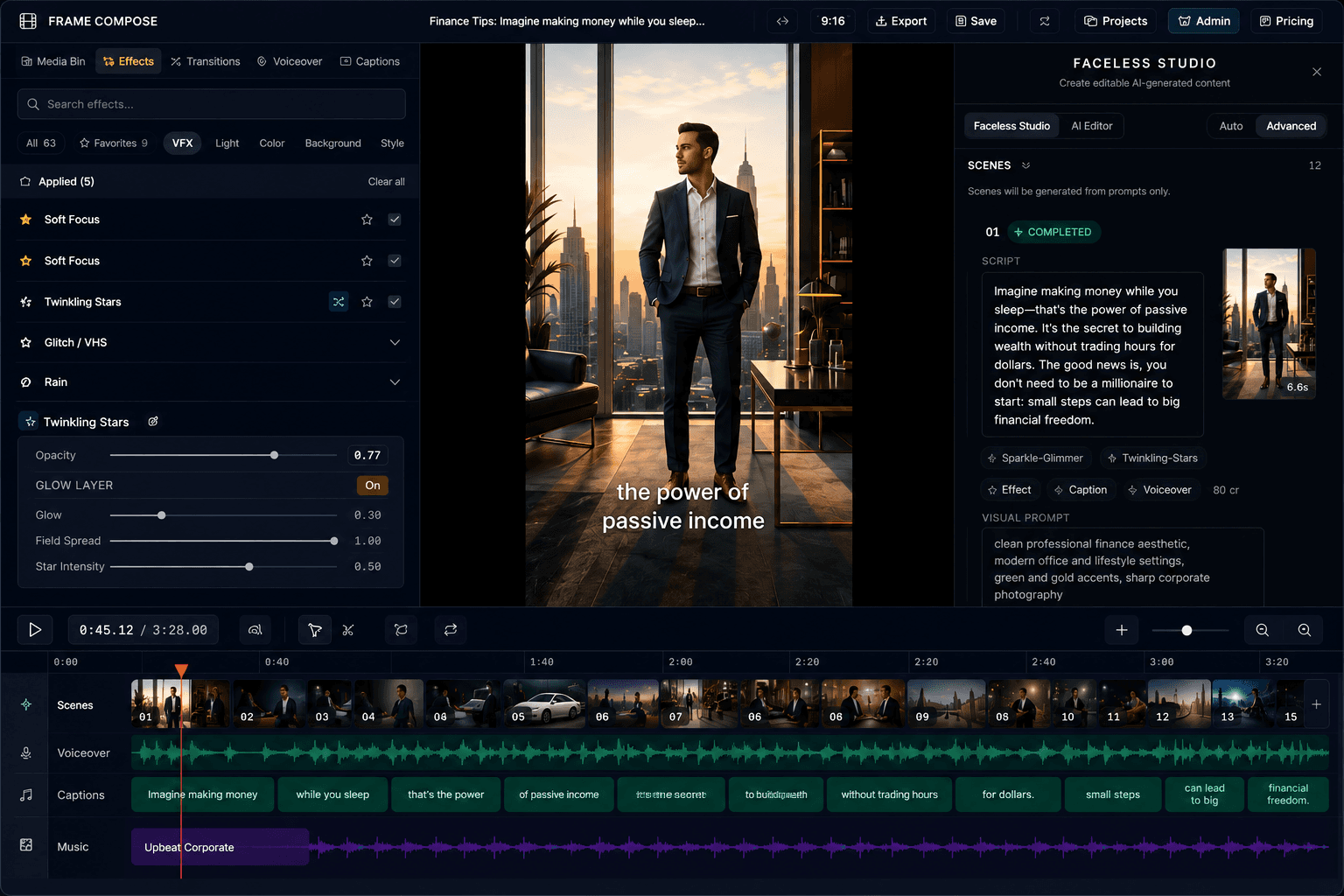
FrameCompose Video Studio with generated scenes, captions, narration, and timeline
Faceless production still uses a real script, scene plan, audio mix, and edit.

Choose a repeatable format and a specific audience promise.

Write a short hook and narration that sound natural aloud.

Use generated, uploaded, or licensed visuals with a clear purpose.

Edit captions, timing, voice, music, and individual scenes before export.

1. Choose a format the viewer can recognise

Pick a structure that suits the subject: an explainer, countdown, story, comparison, tutorial, or commentary format. A repeatable structure makes scripting and editing faster without forcing every episode to say the same thing.

Define the audience and payoff in one sentence. “Three mistakes first-time renters make” gives the script and visuals a clearer job than “a video about renting.”

2. Write the hook and narration for listening

The opening should identify a problem, tension, result, or unanswered question quickly. Read every line aloud and remove filler that only works on a page. Give the narration room for emphasis and visual changes.

Do not hide the topic behind generic suspense. The viewer should understand what the video is about even when the hook delays part of the answer.

3. Give every scene a visual job

Use a new visual when the idea changes, proof is needed, or the pacing benefits from a deliberate beat. Generated scenes, owned footage, screen recordings, diagrams, and licensed stock can all work when they support the spoken line.

Consistency matters, but repeated generic footage becomes invisible. Replace a weak or inaccurate scene instead of regenerating the entire project.

4. Treat voice, captions, and music as the presenter

Choose a voice that fits the subject and proofread its pronunciation. Keep captions concise, readable on a phone, and clear of important visual details. Music should support the rhythm without competing with speech.

Listen once without watching and watch once without sound. Those two passes reveal narration gaps and caption problems that a normal preview can hide.

5. Review, disclose, and keep the project reusable

Check factual claims, generated text, faces, logos, source rights, and platform policies. Label synthetic or illustrative material where the context requires it and avoid presenting generated imagery as documentary evidence.

Save the editable project, voice, caption style, and format choices. Reuse the production system while giving each new video its own research, script, and visual review.

Frequently asked questions

A few quick answers before you jump in.

What is a faceless video?

A faceless video communicates through narration, captions, screen recordings, animation, generated media, stock, or other visuals without relying on the creator appearing on camera.

Do I need to record my own voice?

No. You can use an available synthetic voice, although every line and pronunciation should be reviewed before publishing.

Can faceless videos use my own footage?

Yes. Owned screen recordings, images, clips, and audio can be combined with generated or licensed media in the same edit.

How do I keep a faceless channel consistent?

Reuse a clear format, visual direction, voice, caption treatment, and review checklist while giving each video a distinct promise and researched script.

Related pages

Explore the rest of the workflow, from first idea to final export.