YouTube Shorts guide

One clear promise. One vertical story. No wasted opening.

A strong Short gives the viewer an immediate reason to stay, develops one idea without detours, and remains legible on a phone. Build in 9:16 from the start, then refine the hook, captions, scenes, and sound on an editable timeline.

Maintained by the FrameCompose product team · Last reviewed 12 August 2026

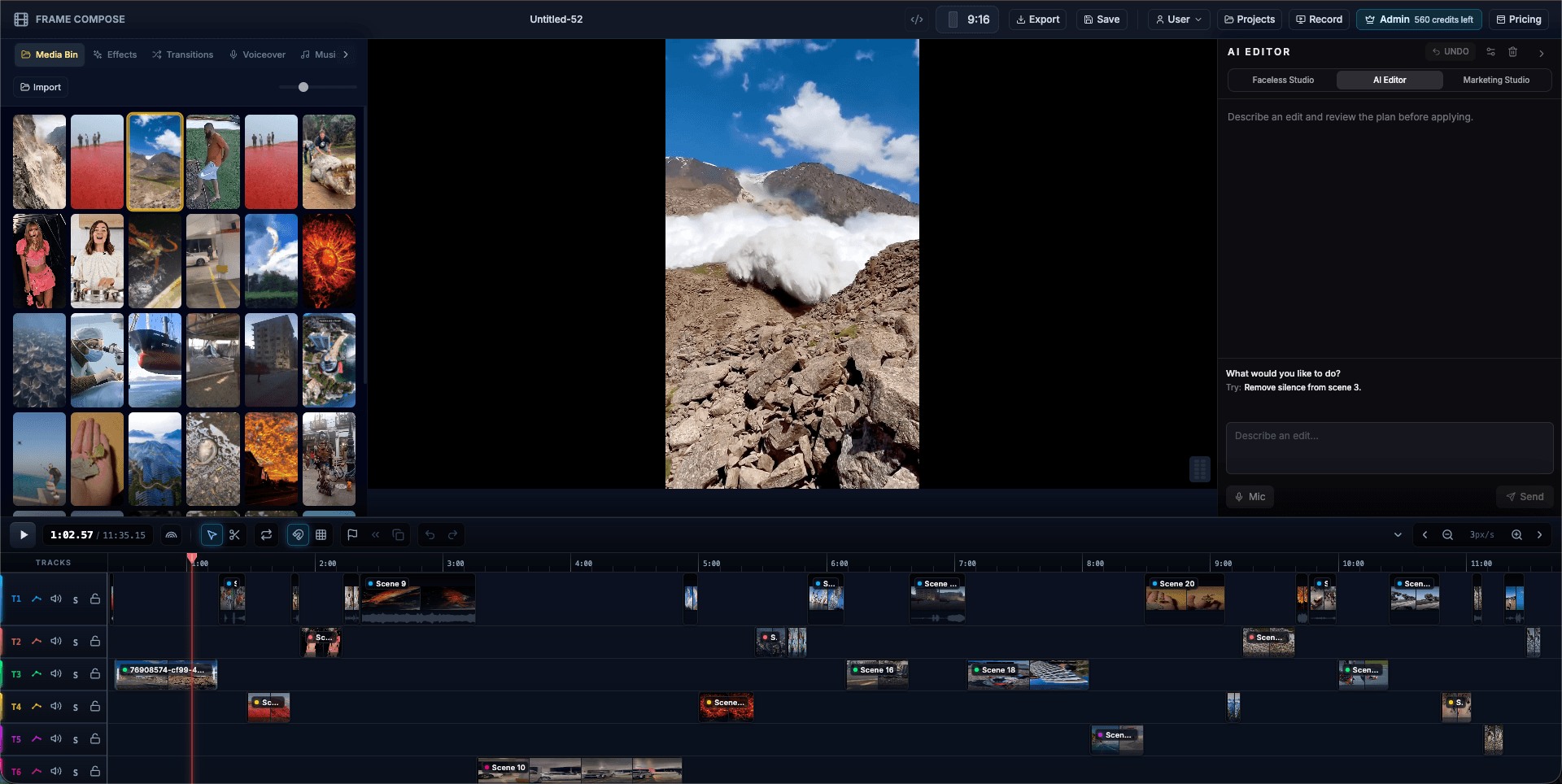
FrameCompose editing a vertical YouTube Short with captions, audio, and multiple scenes
The vertical preview, captions, scenes, effects, and audio remain editable.

Choose one specific idea that fits a short vertical story.

Write the first spoken line and first visual as one hook.

Keep captions readable and every scene useful on a phone.

Preview, trim, and export a clean 9:16 master without platform watermarks.

1. Start with one promise

Choose a result, fact, story, mistake, or question that can be delivered without a long introduction. If the idea needs several unrelated lessons, turn it into a series rather than compressing everything into one Short.

Write the payoff before the hook. Knowing exactly what the viewer receives prevents an opening that creates curiosity but never resolves it.

2. Design the first two seconds together

The spoken hook, first caption, and opening visual should support the same idea. Begin close to the interesting moment and remove greetings, channel introductions, and generic promises such as “watch until the end.”

Make the subject clear enough that the right viewer can recognise it immediately. Confusion can create a swipe just as quickly as boredom.

3. Build specifically for a vertical phone screen

Create or crop media for 9:16 rather than treating vertical as an export setting at the end. Keep faces, product details, and important text away from interface overlays and screen edges.

Use a new scene when it adds meaning, proof, or pace. Constant movement is not a substitute for a coherent explanation.

4. Make the Short work with and without sound

Use clear narration or original audio, then add proofread captions that can be read at normal phone size. Keep lines short enough to absorb without covering the subject.

Balance music and effects below the spoken content. Watch a muted preview to confirm the story still makes sense and listen without looking to find abrupt audio edits.

5. Trim, export, and learn from the result

Remove pauses, repeated ideas, and endings that continue after the payoff. Check the opening on a phone before exporting the final vertical master.

After publishing, use audience retention and swipe behaviour to identify where viewers leave. Reopen the editable project and test a clearer hook or faster section rather than guessing from scratch.

Frequently asked questions

A few quick answers before you jump in.

What size should a YouTube Short be?

A 9:16 vertical project is the clearest default for a phone-first Short. Keep captions and important subjects inside safe areas so platform controls do not cover them.

Do YouTube Shorts need captions?

Captions are strongly useful because viewers may start without sound and because readable text can clarify fast narration. Proofread every caption before publishing.

Can I use AI-generated media in a Short?

Yes, subject to model, platform, and rights requirements. Review generated text, people, products, factual details, and any disclosure obligations.

Can I post the same vertical video to TikTok and Reels?

A clean 9:16 master can be adapted across platforms. Review each platform’s current duration, music, disclosure, safe-area, and upload requirements before posting.

Related pages

Explore the rest of the workflow, from first idea to final export.